
AI & agents
Forms with Super Intelligence.
Describe a form and get it built. Ask SIForm to improve one. Let AI agents create forms, read entries and check payments — with the permissions you choose.
AI form builder
From a sentence to a finished form.
The AI builder reads what you need and builds the fields, steps, required answers, confirmation message and notification email. It runs on your own site with no key — or uses the model you connect.
- Recognises 30+ kinds of form, and the fields you list
- Starts from a hand-made template when one fits
- Adds logic, payments and multi-step layouts when you ask
- Opens straight in the builder — change anything
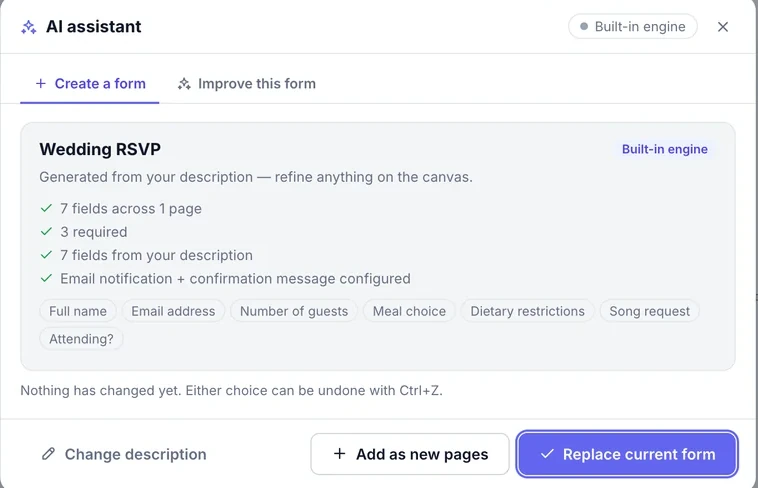
Built-in engine
Works offline, on your server, with no account and no API key.
10 AI providers
Connect your own model, with automatic fallback to the next provider if one is down.
- OpenAI
- Anthropic Claude
- Google Gemini
- Mistral
- DeepSeek
- OpenRouter
- Groq
- xAI Grok
- Together AI
- Ollama
Improve this form
Get suggestions for clearer labels, missing questions and better structure — accept the ones you like.
AI assistant
A second pair of hands inside the builder.
Open the assistant from any form and let it do the fiddly parts.
Draft emails
Notification and confirmation emails written for the form, with the right merge tags.
Draft workflows
Describe what should happen after Submit and get the steps to review.
Write formulas
Explain a price or a score in words; get a working formula for a Calculated field.
Audit the form
Spot missing labels, weak validation and confusing questions before you publish.
Summarise entries
Turn a pile of answers into themes, numbers and a short summary.
Your keys, kept safe
Provider API keys are stored encrypted and never shown in full again.
MCP server
Let AI agents work with your forms.
SIForm speaks the Model Context Protocol. Connect Claude, ChatGPT or any MCP client with a WordPress application password, and it can use SIForm the way you would — within that user’s permissions.
- 36 tools: forms, entries, payments, subscriptions, workflows, email and settings
- Read-only mode and per-tool switches
- Rate limits and an activity log of every call
- The same tools as WordPress Abilities (WordPress 6.9+)
claude — siform MCP
● CONNECTED
you › Make a volunteer sign-up with name, email, available days and a t-shirt size.
agent › create_form
✓ “Volunteer sign-up” published
you › Who signed up for Saturday?
agent › list_entries
✓ 9 people — sent you the list
you › Any payments that failed this week?
agent › payments_report
✓ 0 failed · 41 paid · $3,690 total
Tools
What agents can do.
Each tool is a thin call into SIForm’s own REST API, so permissions, secret masking and the activity log apply exactly as in the admin.
Forms
8
- list_forms
- get_form
- create_form
- update_form
- duplicate_form
- delete_form
- bulk_forms
- get_embed_code
Entries
7
- list_entries
- get_entry
- update_entry
- delete_entry
- bulk_entries
- submit_entry
- list_entry_files
Payments
6
- list_orders
- get_order
- refund_order
- payments_report
- list_subscriptions
- subscription_action
Workflows & integrations
4
- list_workflow_runs
- workflow_queue
- replay_workflow
- integrations_log
3
- mail_status
- mail_log
- mail_send_test
Site
8
- get_dashboard
- search
- list_activity
- get_settings
- update_settings
- list_modules
- set_module
- get_license
Set up
Connected in four steps.
The MCP server is off until you turn it on, and it can only do what the connected user is allowed to do.
01
Turn it on
In WordPress, open SIForm → Modules and switch on the MCP server.
02
Create an application password
Under Users → Profile, add an application password for the user the agent will act as.
03
Add the server to your client
Point Claude, ChatGPT or any MCP client at your site’s endpoint (Streamable HTTP):
yoursite.com/wp-json/siform/v1/mcp
04
Choose what it may do
Keep it read-only, or switch single tools off. Every call shows up in the activity log.
- Runs as a real WordPress user — never more than they can do
- API keys and secrets are masked in every answer
- Limited to 120 calls a minute per user
- Off by default; read-only in one click
Bring Super Intelligence to your forms.
The AI builder, the assistant and the MCP server are all included in SIForm.